
Delta Executor Direct Install is an alternative way to install the Delta iOS app on an iPhone or iPad without manually downloading and sideloading the Delta IPA through a computer or separate signing application.
Normally, installing Delta on iOS involves an IPA file, app signing, certificates, and a sideloading method. Direct Install simplifies this process by reducing the manual steps needed to get Delta installed on an iOS device.
In this guide, we’ll explain how Delta Direct Install works, why it exists, how it differs from IPA sideloading, and how to install Delta on iPhone or iPad without a computer.
What Is Delta Executor Direct Install?
Delta Executor Direct Install is a web-based installation method that lets you install Delta on an iPhone or iPad without manually downloading, importing, and signing the Delta IPA yourself.
With Direct Install, the Delta iOS app is already prepared and signed before it reaches the user. You start the installation from the Direct Install link, while iOS handles the required device-side verification.
iOS still requires app signing; Direct Install simply removes the manual signing step from the user. The Delta IPA is also available for users who prefer to sign and sideload the app manually.
Why Is Delta Also Available as an IPA?
One common way to install Delta on iOS is through its IPA file.
Unlike downloading an app from the App Store, having the Delta IPA file alone does not mean the app is ready to run on an iPhone.
The IPA needs an appropriate signature and provisioning before it can be installed, so users typically follow a signing or sideloading process like the one below.
How Delta IPA Installation Works
Why Was Delta Direct Install Needed?
The IPA method works, but downloading, signing, and sideloading the app adds extra steps.
Delta Direct Install provides a simpler route by reducing these manual installation steps, allowing users to start the Delta installation directly from their iPhone or iPad.
Unlike Delta Android APK installation, iOS has additional signing and verification requirements, which is why a simpler Direct Install option is useful.
Why Are There Two Ways to Install Delta on iOS?
Delta offers both IPA sideloading and Direct Install because they provide two different installation routes.
Direct Install is the simpler option when a working signed build is available, while the IPA method provides an alternative if Direct Install is unavailable or not working.
Do I Need the Delta IPA for Direct Install?
No. Direct Install uses a prepared build delivered through the installation link, so you don’t need to download the Delta IPA separately.
You only need the IPA if you choose the manual sideloading method.
How to Direct Install Delta Executor on iPhone or iPad
You can install Delta directly on an iPhone or iPad without downloading the IPA or using a separate signing app.
Before you begin, delete any older version of Delta already installed on your device to avoid conflicts with the new installation.
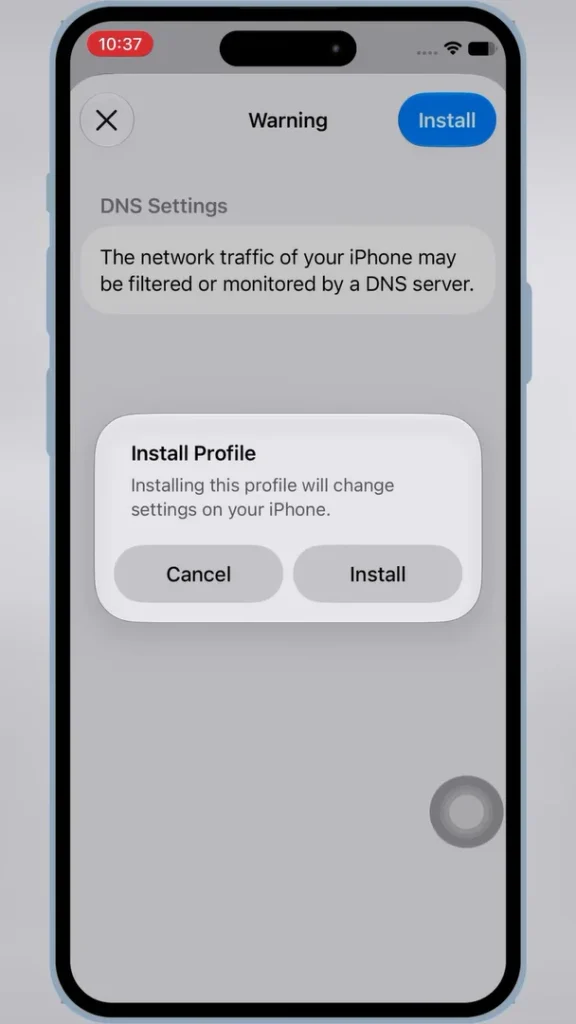
Note: This Direct Install method uses a DNS configuration profile. The DNS profile does not install Delta itself; it is used to support the signed app and help reduce certificate-related blocking or revocation issues.
Step 1: Download and Install the DNS Profile
- First, download the DNS profile on your iPhone or iPad using the button below.
- When Safari asks for permission to download the configuration profile, tap Allow.
- Once downloaded, open Settings, tap Profile Downloaded, then tap Install. Tap Install again when prompted to complete the profile installation.
Step 2: Open the Delta Direct Install Link
- Once the DNS profile is installed, return to Safari on your iPhone or iPad and open the Delta Direct Install link using the button below.
- When iOS asks whether you want to install Delta, tap Install to begin the installation.
Step 3: Trust the Enterprise Developer
Once Delta Executor is installed on your iPhone or iPad, you need to trust the enterprise developer before the Delta app can run on your device.
- Open Settings.
- Go to General.
- Tap VPN & Device Management.
- Under Enterprise App, tap the developer profile associated with Delta.
- Tap Trust, then tap Allow & Restart when prompted.
Step 4: Open Delta Executor
- After your iPhone or iPad restarts, open Delta Executor from your Home Screen.
- That’s it. Delta Executor is now installed on your iPhone or iPad.
How to Run Roblox Scripts on Delta iOS?
- Now that Delta is installed, you’ll need to activate it with a Delta Key before you can execute Roblox scripts.
- Each Delta Key remains active for 24 hours. Once it expires, you’ll need to get a new key to continue executing scripts.
Delta Direct Install Not Working? Common Fixes
If Delta iOS does not install or the Direct Install button stops working, try the fixes below before switching to the IPA method.
Direct Install Button Is Greyed Out
- If the Direct Install button is greyed out or cannot be tapped, open:
- Settings > General > VPN & Device Management > DNS
- Set DNS to Automatic, return to Safari, reload the page, and try the Direct Install button again.
Delta Says “Unable to Install”
- If you see an “Unable to Install” message, try opening the Direct Install link again.
- If the same error continues, the current signed build may not be available. In that case, use the Delta iOS IPA and sideload it instead.
Delta Shows “Untrusted Enterprise Developer”
- If Delta is installed but shows an “Untrusted Enterprise Developer” message when you open it, go to:
- Settings > General > VPN & Device Management > Enterprise App
- Open the developer profile associated with Delta and tap Trust.
What If Delta Direct Install Is Unavailable?
Direct Install relies on a currently available signed iOS build.
If that build becomes unavailable or its certificate stops working, the Direct Install method may temporarily fail.
In that case, you can use the Delta iOS IPA method instead.
Can I Still Install Delta With KSign or Sideloadly?
Yes. If Direct Install is unavailable, you can download the Delta iOS IPA and sideload it using KSign or Sideloadly.
This gives you an alternative way to install Delta on your iPhone or iPad.
Delta Direct Install FAQs
Do I Need a Computer for Delta Direct Install?
No. Delta Direct Install lets you install Delta directly on an iPhone or iPad without using a PC or Mac.
Do I Need KSign or Sideloadly for Direct Install?
No. Direct Install does not require KSign, ESign, Sideloadly, or another separate sideloading tool. These tools are only needed if you choose to install the Delta IPA manually.
What Should I Do If Direct Install Still Doesn’t Work?
If the fixes above do not work, use the latest Delta iOS IPA and a compatible sideloading method instead.
Do I Need the Delta IPA for Direct Install?
No. You don’t need to download the Delta IPA when using Direct Install. The IPA is only needed if you choose the manual sideloading method.
Why Does Delta Say “Untrusted Enterprise Developer”?
This can appear because the Direct Install version uses an enterprise-signed app. Go to Settings > General > VPN & Device Management, open the developer profile associated with Delta, and tap Trust.
Why Do I Need a DNS Profile for Delta Direct Install?
The DNS profile helps support the signed Delta app and reduce certificate-related blocking or revocation issues. It does not install Delta itself; you still need to use the Direct Install link separately.
Can Delta Direct Install Stop Working?
Yes. Direct Install depends on a working signed iOS build. If the certificate is revoked or the signed build becomes unavailable, Delta may stop opening or installing until a working build is available again.
Is Delta Direct Install Safe?
Direct Install uses an iOS configuration profile and an enterprise-signed app, so review any profile or developer certificate before installing or trusting it. Only use the Direct Install links provided in this guide and avoid unknown third-party download pages.
Can I Remove the DNS Profile After Installing Delta?
It’s best to keep the DNS profile installed because it helps prevent certificate issues that could stop Delta from working.
Where Should I Download Delta Direct Install From?
Use the Direct Install and DNS links provided in this guide. Avoid unknown mirrors or third-party pages that may provide modified files or outdated installation links.